 First Beta Release 🎉
Speech to Note
Desktop Companion
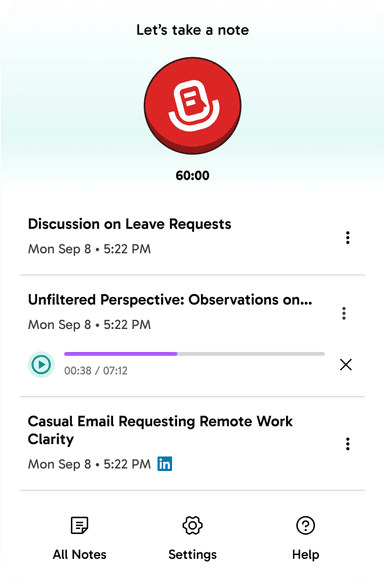
Your powerful desktop companion for seamless voice transcription. Available for Pro & Pro+ users.



Why Desktop Companion?
Complete Offline Storage
All your notes and summaries are stored directly on your device. Your data stays with you, ensuring maximum privacy and security.
Lightning-Fast Hotkeys
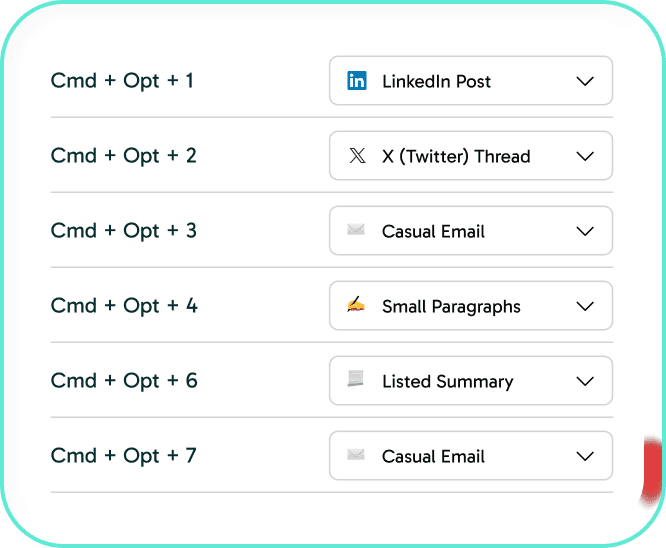
Set up to 10 custom hotkeys for your favorite formats. Start recording, stop, and instantly format your notes with simple keyboard shortcuts.
Independent Note Management
Each transcription and summary stands on its own. Unlike cloud storage, your desktop notes are separate entries for easy organization.
Simple Setup
Just log in with your Speech to Note Pro or Pro Plus account, and you're ready to go. No complex configuration needed.
AI-Powered Processing
While transcription and summarization use cloud processing for accuracy, all final notes remain safely stored on your device.
Seamless Integration
Works alongside your Speech to Note account, giving you the flexibility of both cloud and local storage options.

Master Your Workflow with Hotkeys
Set up to 10 favorite formats and access them instantly with keyboard shortcuts. Combine ⌘ + ⌥ with any number key (0-9) to trigger your most-used formats.
Get Started in Seconds
Download the App
Available now for Mac users with Pro or Pro+ plans
Log In
Use your Speech to Note account credentials
Start Recording
Use hotkeys to capture and format your notes instantly

Available for Mac
Windows version coming soon. Join the beta and be among the first to experience seamless desktop voice transcription.